MP3 TO MIDI · CONTROLLED INPUT CHECK
MP3 to MIDI: what changed when we used WAV?
In our same-source test, the WAV and both MP3 encodings produced identical MIDI files. The pitches matched the programmed melody, but several notes started early and lasted too long. Changing the input format did not fix those timing errors in this sample.
One melody, different input files
We generated a mono sine-wave recording at 44,100 samples per second with 16-bit samples. Its eight programmed pitches were C4, D4, E4, G4, A4, G4, E4 and C4. Every tone lasted 0.42 seconds, followed by 0.16 seconds of silence. The complete recording, including the final silence, lasted 4.64 seconds. These timings came from the generator, so there was a known reference to compare with the conversion.
We encoded that exact WAV into separate 64 kbps and 128 kbps MP3 files with FFmpeg and libmp3lame. We did not use unrelated recordings as a format comparison. Each file was selected through the live page's file picker, converted, and downloaded through its MIDI button. We saved the displayed note rows and independently parsed each download with mido, rather than relying only on the conversion-complete message.
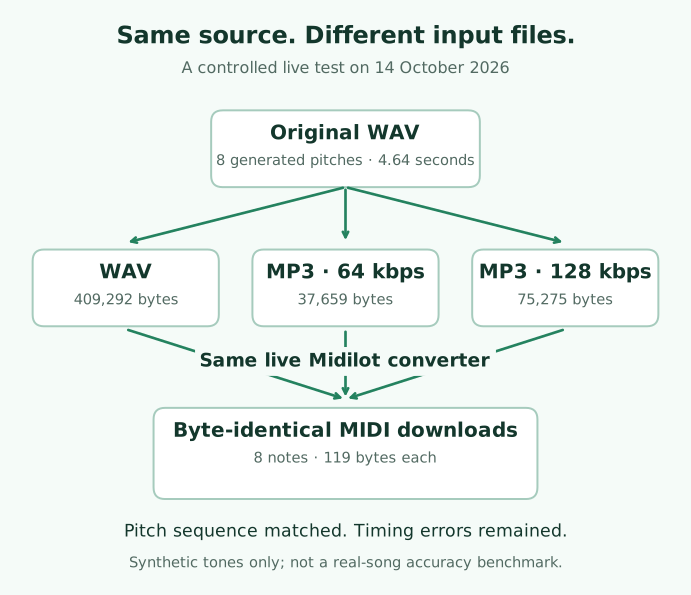
| Input | File size | MIDI result |
|---|---|---|
| Original WAV | 409,292 bytes | 8 notes; 119 bytes |
| MP3, 64 kbps | 37,659 bytes | 8 notes; 119 bytes |
| MP3, 128 kbps | 75,275 bytes | 8 notes; 119 bytes |
The format stayed different; the MIDI did not
The downloaded MIDI files were byte-for-byte identical, not merely similar in the preview. Each contained one track with the programmed pitch sequence. This gives a narrower answer than saying either format is always better: the two MP3 encodings did not change this converter's output for this particular clean, single-note input.
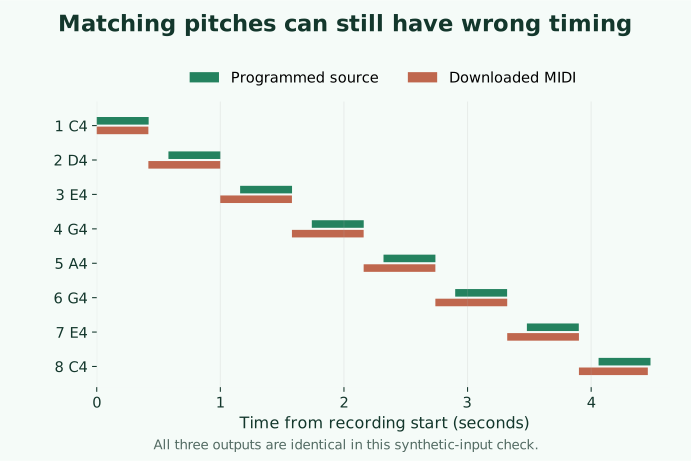
The timing comparison revealed a limitation that the pitch list alone would hide. D4 was programmed to begin at 0.58 seconds and last 0.42 seconds. The page displayed a start of 0.42 seconds and a length of 0.58 seconds for D4 in every conversion. The independently parsed MIDI gave approximately 0.4177 and 0.5813 seconds, respectively. The page rounds its note table to two decimals; the raw record retains the MIDI timings.
Later notes also absorbed preceding silence into their timing in this run. Hearing the expected pitch names is therefore not enough to conclude that the rhythm was preserved. We would move the early note starts and shorten the extended notes in a MIDI editor before using this output as a score or a timed performance. Selecting the WAV version again would not remove an error that was present in all three outputs.
What this check cannot tell you
The source contains separated sine-wave tones. It has no singer, vibrato, percussion, chords, room noise or overlapping instruments. We did not test whether a compressed full mix behaves like its original studio recording. We also did not test every encoder, bitrate or browser. These results cannot establish a general accuracy percentage, a best converter, or a universal advantage for MP3 or WAV.
Use this fixture to see whether your run reproduces the observed behavior. If your file differs, start by checking its hash and the browser you used. Compare your downloaded MIDI with the source timings as well as the pitch names. A valid MIDI file only establishes that its note instructions can be read; it does not establish that those instructions are a faithful transcription of the recording.
Download the inputs and the evidence
- Same-source inputs: original WAV, 64 kbps MP3, 128 kbps MP3.
- Actual outputs: WAV run, 64 kbps run, 128 kbps run.
- Method, encoder commands, hashes and full note events; WAV fixture generator.
Which website or app should I use to convert audio to MIDI?
For one supported file and a dominant-melody estimate, use the converter above: choose the audio, convert it locally, review the notes and download MIDI. You do not need to register. For this test input, the next useful step was editing note timing, not choosing another input format. If your aim is separate instrument tracks or drum transcription, this tool does not provide those capabilities. A MIDI editor or DAW can correct a melody draft after conversion.
For the chord counterexample and the audio-versus-note distinction, see our WAV to MIDI reference check.
Watch this controlled experiment with a spoken explanation of the method and timing comparison.