AUDIO TO MIDI / CHOOSE YOUR OUTPUT
Best audio to MIDI converter
For a browser MIDI draft, try Jukeblocks or OpenMusic with your source. Both returned the expected pitches in our synthetic checks below. Midilot is a local single-melody option; it did not recover our test chord. Songscription’s direct-transcription test is paused at its terms step.
Compare the workflow before comparing the sound
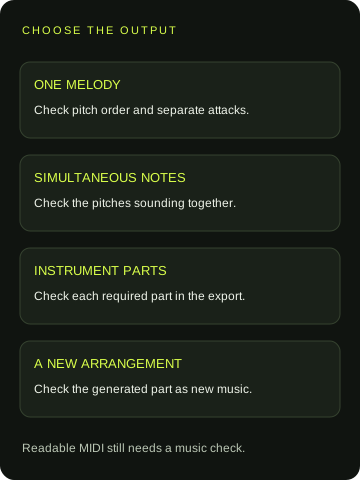
The useful choice depends on whether you need a melody draft, simultaneous chord notes, instrument tracks or an arrangement. A page offering MIDI download does not establish all of those capabilities. Here is what we could verify from the tools’ own pages on the date above.
MIDILOT · OWN TOOL / TESTED
One melody, processed locally
No account is required. Select a decodable audio file up to five minutes, review the note list and download a single-track MIDI draft. Chords and instrument separation are outside its scope. Our actual timing and chord failures appear below.
Read the tested workflow →JUKEBLOCKS · TWO LIVE EXPORTS CHECKED
A free MP3/WAV file workflow
The free page lists MP3/WAV input, 100 MB and five minutes, with a separate Recreate product for instrument parts. After an initial busy response, our follow-up obtained eight melody events and 24 chord events. Both native MIDI downloads were independently parsed; exact results are below.
Check Jukeblocks’ converter →OPENMUSIC · TWO LIVE EXPORTS CHECKED
File and recording entry points
The page offers file and recording entry points and a MIDI editor. In this session we selected each original WAV, used Convert to MIDI and downloaded the result without signing in. Independent inspection found eight melody events and 24 chord events. This does not establish performance on real recordings.
Check OpenMusic’s workflow →SONGSCRIPTION · FLOW CHECKED / EXPORT PENDING
An advertised instrument-part workflow
Its page advertises instrument parts and free 30-second clips. We selected the melody WAV and reached Piano → Transcription. The final submission requires agreeing to PlayAnything’s terms; our test is paused for owner confirmation. No MIDI has been obtained, so its conversion quality remains unmeasured.
Check Songscription’s modes →The measured outputs below come from the same two synthetic fixtures. We did not buy plans, measure speed or test finished songs. Basic Pitch remains a separate, untested brand reference. These checks support a task-specific shortlist; they do not establish a universal accuracy winner.
Same-source conversion results
Jukeblocks and OpenMusic received the exact two original WAVs used for the Midilot checks below: the eight-note melody and the repeated C-major chord fixture. Each file is 4.64 seconds, mono PCM, at 44,100 samples per second. These are generated sine tones, not piano, singing or a full mix. We left the converters’ available settings at their defaults and used their file and download controls. The four newly saved MIDI files were inspected independently with mido.
Narrow screen: scroll sideways. Melody timing means use all eight exact paired starts; lower values apply only to this fixture.
| Converter | Melody events / mean absolute onset error | Chord result | Evidence status |
|---|---|---|---|
| Midilot | 8 events · 0.140417 s | 1 event · C2; no C4/E4/G4 chord | Own exporter; valid file, failed chord fixture |
| Jukeblocks | 8 events · 0.004886 s | 24 events · C4/E4/G4; max 3 together | 1075 B melody / 266 B chord; parsed |
| OpenMusic | 8 events · 0.003802 s | 24 events · C4/E4/G4; max 3 together | 135 B melody / 262 B chord; parsed |
| Songscription | No exported MIDI | No exported MIDI | Paused at terms confirmation; quality not measured |
Jukeblocks’ melody download is a 1,075-byte format-1 MIDI with two tracks and 220 ticks per quarter note. OpenMusic’s is a 135-byte format-1 MIDI with two tracks and 480 ticks per quarter note. Both contain the programmed eight-pitch sequence without extra note events. The timing rows above are computed from the saved event starts, not the playback animation or a vendor accuracy claim. Different file sizes and resolutions are properties of those exports, not quality scores.
The chord downloads contain 24 events each. Independent parsing found the unique pitches MIDI 60, 64 and 67, with a maximum overlap of three sounding notes. Jukeblocks’ file has 266 bytes; OpenMusic’s has 262. That is a materially different result from Midilot’s single C2 event on the same input. It supports trying either converter for this simple synthetic chord case. It does not demonstrate separation of instruments, preservation of a real piano performance or complete recovery of a finished song.
For each melody export we paired the eight same-pitch events in sequence and calculated sum(|exported start − programmed start|) / 8. Jukeblocks gives 0.039090909… / 8 ≈ 0.004886 seconds; OpenMusic gives 0.030416666… / 8 ≈ 0.003802 seconds. Every programmed start and exact exported start is retained in the event record below. These are mean absolute onset errors for one generated melody. The displayed means are rounded to six decimal places; they are not probabilities, full-song accuracy percentages or a general tool ranking.
Songscription needed a native file-picker click before accepting the melody WAV. We then selected Piano and explicitly chose Transcription after the automatic route offered an arrangement. The interface warns that this mode needs piano audio; our sine-tone fixture is not a piano performance. The final step says proceeding agrees to PlayAnything’s terms and privacy policy. We paused before that submission for owner confirmation. No MIDI or musical measurement is recorded for it.
What our own downloaded MIDI actually contained
We ran the following original synthetic WAVs through the live Midilot homepage on 19 October 2026. The file picker, converter and native download were used; a separate MIDI parser inspected the saved files. These are simple sine tones, not singing, an instrument performance or a finished song.
Eight correct pitch labels can still need timing edits
Our reference melody contains the MIDI pitches 60, 62, 64, 67, 69, 67, 64 and 60, in that order. Each programmed tone lasts 0.42 seconds, then leaves 0.16 seconds of silence. The onset spacing is therefore 0.42 + 0.16 = 0.58 seconds. Eight such slots make a 4.64-second file. The original WAV generator and its event definition are linked below, so the intended starts do not depend on a listener guessing where each note began.
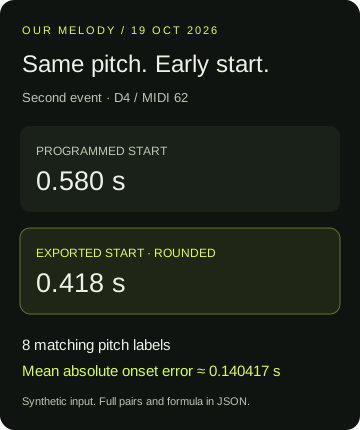
The saved output had 119 bytes and eight note events with that same pitch sequence. This passes a narrow pitch-sequence check for this particular input. It does not pass an exact timing check. The first exported note ends at approximately 0.417708 seconds, and the next starts at that same time. Its programmed start was 0.58 seconds. The second event is therefore early by 0.417708 − 0.580000 ≈ −0.162292 seconds.
The table uses the independently parsed event starts rather than the page’s two-decimal display. For each event we matched the same pitch in the same sequence, then calculated exported start minus programmed start. We rounded only the displayed columns to three decimals; the downloadable record keeps full precision. All events after the first begin early in this example. Counting eight matching pitch labels would conceal that editing work.
Narrow screen: scroll the table sideways to compare all columns.
| Event / pitch | Programmed start | Exported start | Difference |
|---|---|---|---|
| 1 / MIDI 60 | 0.000 | 0.000 | +0.000 |
| 2 / MIDI 62 | 0.580 | 0.418 | -0.162 |
| 3 / MIDI 64 | 1.160 | 0.999 | -0.161 |
| 4 / MIDI 67 | 1.740 | 1.579 | -0.161 |
| 5 / MIDI 69 | 2.320 | 2.159 | -0.161 |
| 6 / MIDI 67 | 2.900 | 2.740 | -0.160 |
| 7 / MIDI 64 | 3.480 | 3.321 | -0.159 |
| 8 / MIDI 60 | 4.060 | 3.901 | -0.159 |
The mean absolute onset error is sum(|exported start − programmed start|) / 8. Using all eight exact pairs in the raw record gives 1.123333… / 8 = 0.1404166… seconds, or approximately 0.140417 seconds. The numerator is the sum of the eight absolute differences, not the total audio length. This is a calculation for these matched synthetic events, not a percentage accuracy score or a result for another converter.
A useful acceptance decision follows directly from this file: if you only need the pitch sequence as a starting draft, the result provides it; if you need the programmed rests and entrances preserved, this output still needs correction. The late part of the file does not become correct merely because the MIDI opens successfully. Compare the event list with the supplied source definition before quantizing or replacing the instrument.
A valid file can be the wrong output for a chord task
The other original WAV places MIDI pitches 60, 64 and 67 together during each sounding section. It has the same 4.64-second file length as the melody fixture. In this run Midilot produced a valid 56-byte MIDI file containing one note, MIDI 36, labeled C2, from 0 to approximately 4.458333 seconds. The three intended simultaneous pitches were absent from the output. This is a concrete failure for this chord input, even though the interface reported that the MIDI was ready.
That observation changes the shortlist for an overlapping-note task: our single-line converter is unsuitable for recovering this chord. It does not establish that any competing tool will recover it correctly. Use the downloadable chord WAV as an additional check when evaluating a tool that advertises polyphonic transcription. A candidate needs to return the simultaneous notes you require; one readable track or an attractive piano roll is not enough evidence.
Separate exported settings from detected performance
Both saved files use MIDI format 0, one track and 480 ticks per quarter note. Their tempo event is 500,000 microseconds per beat, so 60,000,000 / 500,000 = 120 BPM. Every note-on in these outputs has velocity 88. Those values match Midilot’s fixed exporter settings. They do not show that the original recording was performed at 120 BPM or with constant loudness. An instrument change can alter playback sound, but cannot add the missing chord events or restore the programmed silent gaps.
The first Jukeblocks attempt returned a busy message and no MIDI. A later follow-up on the same date produced native MIDI from both original WAVs. The current results are in the comparison table above. The original busy response remains part of the record; it is neither the final conversion outcome nor a detector-accuracy measurement.
Choose the converter that fits your next edit
If you want a quick solo-melody draft
Try Midilot or Jukeblocks with a short, permitted recording. Midilot’s own results above show why pitch order and timing need separate checks. For step-by-step operation, use the audio to MIDI tutorial.
If you need chords or separate instruments
For our simple chord fixture, Jukeblocks and OpenMusic returned the intended pitch classes with three notes sounding together. A full mix is a different test. Songscription’s instrument-part claims remain unverified here. Our Midilot chord failure is evidence to exclude it for recovering this chord.
If expression matters
Basic Pitch advertises pitch-bend detection. Test a permitted phrase with a bend and check the exported messages; we did not do that test here. A row of stepped note names and a pitch-bend event are different representations. Fixed-velocity notes do not preserve a performance’s dynamics.
If you want a different arrangement
Choose a service mode that explicitly generates a part. Do not score a newly composed accompaniment as a literal transcription of the original notes. Keep the source recording and the resulting MIDI beside each other when reviewing either task.
Questions before you choose
Which is the best free audio to MIDI converter?
For a single melody draft, Midilot and Jukeblocks offer free browser workflows. Spotify’s Basic Pitch demo is another free option with advertised pitch-bend detection. They are starting points for different needs; this comparison does not establish a universal accuracy winner. Try your source and inspect the downloaded file.
Which converter is the most accurate for a full song?
We do not have a comparable full-song test across these engines, so we cannot name a winner. Check that the output mode covers simultaneous notes and instrument parts, then inspect a representative authorized recording. Our synthetic Midilot chord test demonstrates a limitation of our tool, not the competitors’ measured accuracy.
Does a bigger MIDI file mean a better conversion?
No. Our 119-byte melody file contains eight events, while our 56-byte chord output contains one incorrect pitch for the task. File size tells you neither whether timing matches nor whether every required instrument is present. Inspect the event content against the source.
Can I use the result for sheet music?
Correct the notes and timing first, then try MIDI to sheet music. A notation view represents the events it receives; it does not independently restore missing chord notes. Keep audio transcription and notation formatting as separate checks.