Convert a digital score into playable notes
This sheet music to MIDI converter reads uncompressed partwise MusicXML, the structured score format exported by notation editors. Choose a .musicxml or .xml score and download its pitched note events as MIDI. A printed PDF or photograph is a different input: it must first be recognized and corrected as a digital score.
To turn sheet music into MIDI, export MusicXML from the editor containing your score, choose that file here, and review the displayed pitch, start and length values before downloading. The resulting MIDI contains note instructions; select an instrument in your music software to hear them.
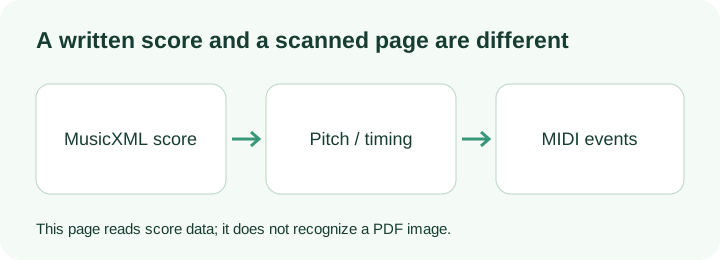
How this page reads a music score
The reader walks each part and each written measure. MusicXML divisions define the duration unit: if divisions is 4, a duration of 3 occupies 0.75 quarter-note beats. The reader advances the musical cursor for ordinary notes and rests. A chord note starts with the preceding note; it does not move that cursor a second time.
Backup and forward elements move the cursor between voices, so two written voices do not automatically become a single consecutive melody. The measure advances by its written meter or its actual occupied duration, whichever is longer. A measure explicitly marked as an implicit pickup uses its occupied duration instead.
Pitch comes from the step, octave and semitone alteration in the score, not from guessing pixels on a staff. Sound ties join matching pitches in the same voice into one MIDI event. Pitched parts receive separate MIDI channels. This export uses velocity 88 and the initial score tempo; velocity is a default, not a measurement of how loudly somebody played.
The status reports limitations found in your file. Grace notes and unpitched percussion are skipped. Repeats are played once as written; instrument transposition and later tempo changes are not applied. These decisions make a basic local export possible, but they do not replace a notation editor's full playback engine.
An original score with exact note events
Choose Try original sample to read the two-measure reference score. It contains C4, D4, E4, G4, A4, G4, E4 and C4, with starts at beats 0 through 7. Each pitched note has duration 3 at divisions 4, followed by a rest of duration 1. Each four-note group therefore occupies a complete 4/4 measure.
The input specifies a tempo of 120 BPM. One quarter-note beat lasts 60 / 120 = 0.5 seconds, so the first note's 0.75-beat key duration corresponds to 0.375 seconds. The last note begins at 3.5 seconds and its key ends at 3.875 seconds. All inputs in that calculation come from this original score and the programmed reference record.
After exporting, open the MIDI in the staff viewer or the audio renderer. Compare the eight note events rather than claiming that an audible file proves a whole score was preserved. This score was created locally for checking the pipeline; it is not a scanned-page recognition benchmark.
PDF sheet music to MIDI
A PDF often contains page shapes or scanned pixels rather than structured note events. This page does not perform optical music recognition and does not accept a PDF as MusicXML. Use a score-recognition editor to recover a digital score, correct its pitches and rhythm, then export uncompressed MusicXML for this local step. Renaming .pdf to .xml does not create note data.
Questions before importing
Can I convert sheet music to MIDI from an XML file?
Yes, if the file is a partwise MusicXML score with pitched notes. The actual XML structure is checked. An unrelated XML document is rejected.
Does music score to MIDI preserve the printed layout?
No. MIDI stores playback events, not page geometry, lyric placement or engraving. Keep the original MusicXML if you need the written score.
Can I choose compressed MXL?
This local reader accepts uncompressed .musicxml or .xml files. Export that form from your notation editor first; compressed MXL is not supported here.
What the score-import run displayed
On 14 October 2026, Try original sample read the two-measure MusicXML file and reported eight pitched notes in one part at 120 BPM. The displayed starts were 0 through 7 beats, and every displayed length was 0.75 beats. A MIDI download was generated. Compare that table with the reference score, rather than assuming that a download alone proves the input was read correctly.