AUDIO TO MIDI / KEEP A LOOP IN TIME
Audio to MIDI for a tempo-matched loop
Four beats last 2.0 seconds at 120 BPM or 2.666668 seconds at 90 BPM. After a further tail adjustment, our live Chrome retest returned the four programmed pitches and placed the last note's end close to its source MIDI end; entering each source BPM set the matching MIDI tempo.
Quick answer. Duration = beats × microseconds per quarter note ÷ 1,000,000. Enter the source BPM before converting. The earlier production test produced extra notes and a 120 BPM tempo event; the retest below used the revised detector and chosen BPM.
Calculate the four-beat length first
A quarter-note beat is the time represented by the MIDI tempo event. For this constant-tempo control, compute the duration from the exact event value:
Seconds = beats × microseconds per quarter note ÷ 1,000,000.
At 120 BPM the event value is 500,000 microseconds per quarter note, so four beats take 4 × 500,000 ÷ 1,000,000 = 2.0 seconds. The 90 BPM file stores 666,667 microseconds per quarter note, so 4 × 666,667 ÷ 1,000,000 = 2.666668 seconds. The source files use 480 ticks per quarter note and place C4, D4, E4 and G4 at the start of beats one through four.
Audio length can exceed the musical phrase. The MIDI-to-MP3 page adds a half-second render buffer after the programmed note end. Our WAV files therefore last 2.500000 and 3.166712 seconds. That buffer is an allocated output duration; we did not measure how long a tone remains audible inside it.
Final release tail retest
On the live Midilot converter on 3 November 2026, we enabled the optional final-release estimate and converted the same two WAVs. The downloaded MIDI files were byte-identical to the preview retests. Both downloads still contain C4, D4, E4 and G4. At the chosen tempos, the last note ends at 2.005208 seconds for the 120 BPM input and 2.673612 seconds for the 90 BPM input. The programmed source MIDI ends were 2.000000 and 2.666668 seconds: differences of +0.005208 and +0.006944 seconds. These are two synthetic controls, not a general accuracy score.
A fade in a recording can be part of the performance, so this release estimate is optional. Download the 120 BPM tail retest · Download the 90 BPM tail retest.
Pitch and tempo retest before the tail adjustment
On the live Midilot converter on 3 November 2026, we converted the same two WAVs after deploying the updated detector. Both MIDI downloads contained C4, D4, E4 and G4 with no extra C♯4 or D♯4. We entered 120 and 90 BPM respectively; independent parsing found tempo events of 500,000 and 666,667 microseconds per quarter note. Tempo is chosen by the user, not inferred from audio.
The returned starts were 0.000, 0.510, 0.999 and 1.532 seconds for the 120 BPM file, and 0.000, 0.674, 1.347 and 2.019 seconds for the 90 BPM file. They remain estimates. Download the 120 BPM retest · Download the 90 BPM retest.
Original production results before the detector update
The following results and diagram record the earlier run, before the detector and tempo control were changed.
One four-note pattern at two tempos
We programmed two format-0 MIDI controls with one track and four quarter-note events: C4, D4, E4 and G4, each one beat long. The controls differ in their tempo meta event: 500,000 microseconds per quarter note at 120 BPM and 666,667 at the 90 BPM label. We selected each file on the live MIDI-to-MP3 page, kept its Soft sine setting, converted it, and downloaded the actual WAV. Each render was mono 16-bit PCM at 22,050 Hz.
Next we selected those WAV files one at a time on the live WAV-to-MIDI page and downloaded the generated .mid files. The page reported four pitched notes before conversion, then displayed six detected notes. We independently parsed both downloaded MIDI files from their bytes. They are format 0, one track, 480 ticks per quarter note, and each carries a tempo event of 500,000 microseconds per quarter note.
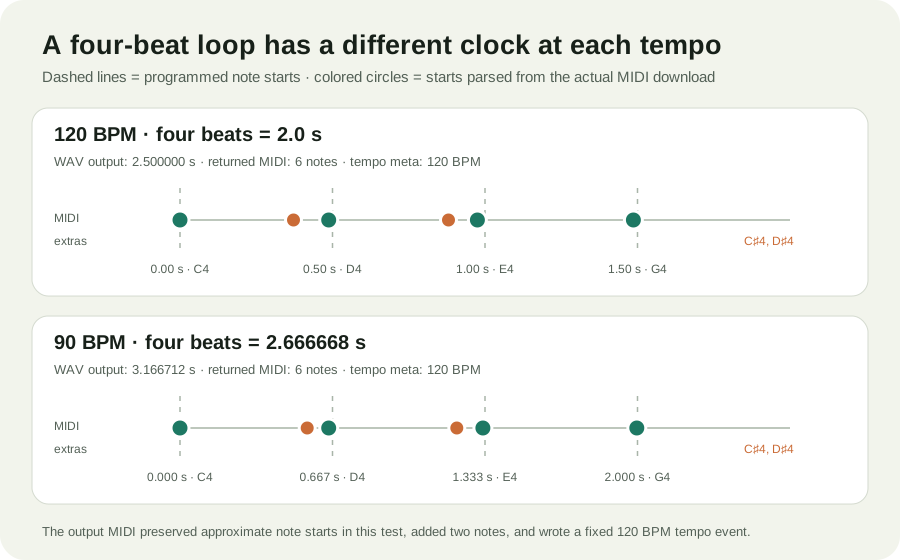
The four intended pitches were present in both files, but each result also contained C♯4 and D♯4 between the expected notes. For the four expected pitches, the mean absolute onset error was 0.012760 seconds at 120 BPM and 0.007292 seconds at 90 BPM. Formula: sum of the absolute differences between each returned expected-pitch start and its programmed start, divided by four. This calculation excludes the two extra notes; the full event lists below keep them visible.
| Input | Pitch | Input start | Returned start | Error |
|---|---|---|---|---|
| 120 BPM | C4 | 0.000000 s | 0.000000 s | 0.000000 s |
| D4 | 0.500000 s | 0.487500 s | −0.012500 s | |
| E4 | 1.000000 s | 0.975000 s | −0.025000 s | |
| G4 | 1.500000 s | 1.486458 s | −0.013542 s | |
| 90 BPM | C4 | 0.000000 s | 0.000000 s | 0.000000 s |
| D4 | 0.666667 s | 0.650000 s | −0.016667 s | |
| E4 | 1.333334 s | 1.323958 s | −0.009376 s | |
| G4 | 2.000001 s | 1.996875 s | −0.003126 s |
The original 90 BPM export said 120 BPM
The original audio-to-MIDI output for the 90 BPM WAV stores a 500,000-microsecond tempo event, which equals 120 BPM. Its note ticks were written so that, when interpreted using that file tempo, the measured note starts correspond to about 0.650000, 1.323958 and 1.996875 seconds. The file does not label its tempo event as 90 BPM.
If you plan to place a generated file into a DAW project with a different tempo, inspect the imported notes and the DAW's tempo mapping before quantizing. A file with plausible start times can still contain extra pitches or a tempo event that does not match the source BPM. Preserve the original WAV until you have checked both.
Scope: two constructed sine-tone loops, one browser profile, the current Midilot implementation and the downloaded files listed here. This does not measure human performances, chord transcription, another service, or song-wide accuracy. Monthly search volume for this scenario phrase is no data.
Use a converted melody in a tempo-matched loop
-
Work from one clear melodic part
Choose a recording you are allowed to process. The WAV-to-MIDI converter estimates one dominant melody; it does not separate a finished mix into instrument tracks. Keep the source audio as your reference.
-
Calculate the beat spacing
For a four-quarter-note phrase, calculate its musical duration from the tempo event before editing. The two tested controls used 0.5 seconds per beat at 120 BPM and 0.666667 seconds per beat at the 90 BPM label.
-
Compare starts before snapping to a grid
Check the note names and their start times against the source. In this test, all four programmed pitches were present, but two additional pitches appeared. The 90 BPM export also wrote a 120 BPM tempo event.
-
Keep separate source and MIDI files
Download the MIDI for editing and keep the original audio. If you want a simple synthesized preview, use MIDI to MP3. The synthesized preview is not the original recording, and the audio file's tail can extend beyond the programmed notes.
Question before looping a converted file
Does an audio-to-MIDI file keep the source tempo?
Editorial check: the tempo is not detected from audio; enter the source BPM if known. In the original run, it was fixed at 120 BPM. Both actual outputs in our test stored a 120 BPM tempo event. That includes the file converted from the 90 BPM WAV. The four intended pitches appeared in each output, but each also included C♯4 and D♯4. Compare the real MIDI events with the source audio before lining the clip up to a loop. This answer describes the measured Midilot run, not every converter.
Competitor page readConvert.Town's BPM Detector describes an audio BPM detector and lists supported audio formats. Those are statements from its page; we did not submit either WAV or measure its results. The measurements above come only from Midilot's production pages.
Continue with the audio-to-MIDI guide for file selection and note review, or the transposition walkthrough when you need to move a reviewed MIDI draft to another key.