MP3 TO MIDI / STEP BY STEP
How to convert MP3 to MIDI
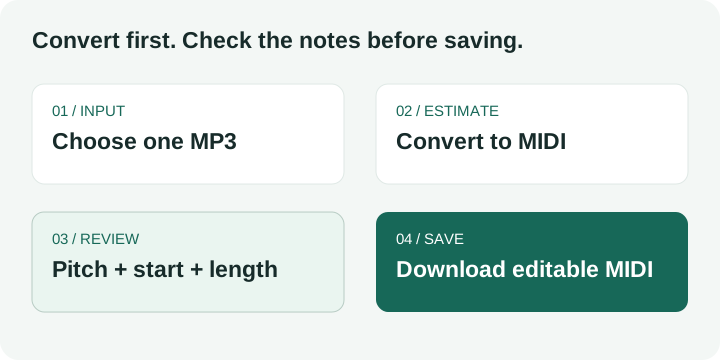
Open Midilot, choose one MP3, select Convert to MIDI, check the detected notes, then select Download MIDI. Start with a clear solo melody. The output is an editable note draft; it does not preserve the recording's voice or separate every instrument.
One file at a time, up to five minutes. Audio is processed locally in your browser. You can follow the steps with your own permitted recording or use the original short MP3 below.
Convert a file, then check what it actually contains
Choose a short MP3
Open the converter using the button above. Select Choose an audio file and pick your MP3, or drop one file into the outlined area. Confirm the displayed filename before proceeding. For a controlled first run, use our 4.64-second melody rather than a full arrangement: you have a known note list to compare with the result.
Run the conversion
Select Convert to MIDI. The page decodes the recording and estimates a dominant pitch line. When the result appears, look for Your MIDI notes, the piano roll, and the detected-note table. A completed progress state means processing finished; it does not mean every musical decision is correct.
Review three columns together
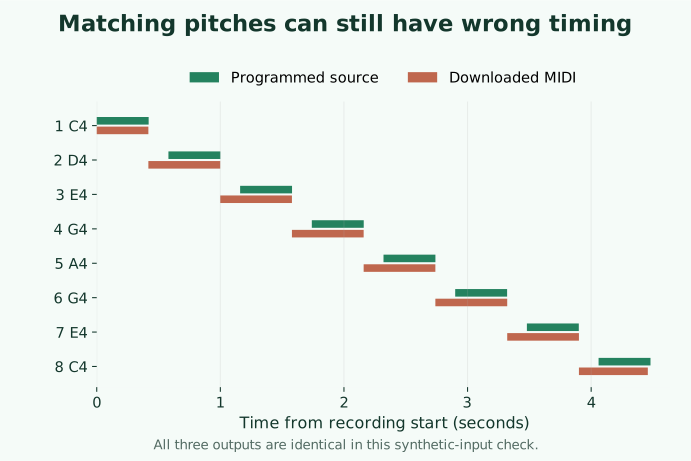
Read Note, Start, and Length. Compare the order of pitches first, then compare where each note starts and stops in the recording. In our reference run, all eight pitch labels looked right while several timing boundaries were wrong. Checking only the pitch column would have missed the problem.
Save the MIDI draft
Select Download MIDI. The downloaded file contains note events rather than the MP3 sound. Import that file into an editor you already use and inspect its piano roll before arranging or printing notation. Midilot's MIDI to sheet music tool can produce a staff draft, but a timing error remains an error when displayed on a staff.
A measured example: correct pitches, early boundaries
Our original input is a programmed sine-wave melody: C4, D4, E4, G4, A4, G4, E4, C4. Each tone lasts 0.42 seconds and starts 0.58 seconds after the preceding tone. We encoded that same WAV as 64 and 128 kbps MP3, converted all three files through the production browser interface on 14 October 2026, and independently read the downloaded MIDI events with mido.
All three exported MIDI files were byte-identical and contained eight notes. This is one controlled synthetic input, not a real-song accuracy benchmark. The MP3 encodings did not introduce a different MIDI result here; changing to WAV also did not repair the existing boundary errors.
| Value | Input (s) | MIDI (s) |
|---|---|---|
| Start | 0.580000 | 0.417708 |
| Length | 0.420000 | 0.581250 |
The D4 start error is observed minus expected: 0.41770833333333335 − 0.58 = −0.16229166666666665 seconds, or approximately 0.162 seconds early. The length error is 0.58125 − 0.42 = 0.16125 seconds, or approximately 0.161 seconds too long. Both input values and MIDI values are in the raw same-source test record; the table rounds the MIDI start to six decimal places.
The visible note table rounds these values further: D4 appears at 0.42 seconds with a length of 0.58 seconds. Those rounded numbers are useful for spotting a boundary problem; use the raw events if you need to calculate an error. The expected D4 ends at 0.58 + 0.42 = 1.00 seconds. Its detected early start and longer duration must be reviewed separately, even when its ending is close.
What to edit after conversion
Start with note boundaries you can verify against your source. For the reference D4, move its beginning to the programmed 0.58-second point and shorten it to the programmed 0.42-second tone. Those are ground-truth values for this generated sample. For your own music, determine boundaries from your recording rather than applying our sample's numbers.
The current Midilot audio converter writes a 120 BPM tempo event and a fixed note velocity of 88. These are export settings in our implementation, not measurements of the performer's tempo or loudness. A DAW's beat grid may therefore look misleading until you align the imported events with your project. Check actual note timing before quantizing; snapping already incorrect starts to a grid can hide the original discrepancy.
If a dense mix produces one sequence of notes, do not interpret that as a complete arrangement. This converter estimates one dominant pitch line. It does not label instrument stems, rebuild drum parts, or return every simultaneous chord note. Our separate original C4/E4/G4 chord check returned a C2 event; its input and observed result remain available on the WAV reference page.
Reference files you can inspect
Use the same source files to repeat the tutorial. The measurement date above belongs to the saved experiment; it is not a claim that every new browser or recording will return the same result.
Questions about turning MP3 into editable notes
How do I convert MP3 to MIDI without installing anything?
Use the browser converter linked at the top, choose your MP3, run conversion, inspect the result and download the MIDI. Midilot performs this step locally without creating an account. You still need to review its dominant-melody estimate; browser access does not make a full song a reliable input.
How to convert MP3 into MIDI I can edit?
Download the MIDI result after checking the note list. Open the saved file in a MIDI editor or DAW. Editing note pitch, start and length is a separate step from changing the input audio format. The exported file's fixed tempo and velocity are described above.
How to turn MP3 into MIDI for sheet music?
Convert and review the MIDI first, then open the MIDI to sheet music tool. Select the pitched part and inspect the generated staff. The audio to sheet music guide explains that chain. Returning a readable score does not independently verify the notes that entered it.
How to turn MP3 to MIDI when the rhythm is wrong?
Compare note starts and lengths with the source before exporting to notation. In the measured example, WAV and both MP3 files returned the same boundary errors. Merely re-encoding that input did not fix them. Edit the events or use a different transcription method appropriate to your material; we have not tested every song or every competing converter.
Can this recover jazz chords from a whole song?
Midilot's current converter is a single dominant-pitch estimator, so it is not a complete chord or multi-instrument transcription workflow. A chord-heavy arrangement needs a method that can handle simultaneous notes and a separate review of the result. The synthetic chord failure above is a concrete reason to check this boundary before choosing this tool.
Keep the recording and the editable MIDI draft together. The note file is useful only after you have checked what it represents.