AUDIO TO MIDI / A MELODY IN ANOTHER KEY
Transpose a melody after audio to MIDI
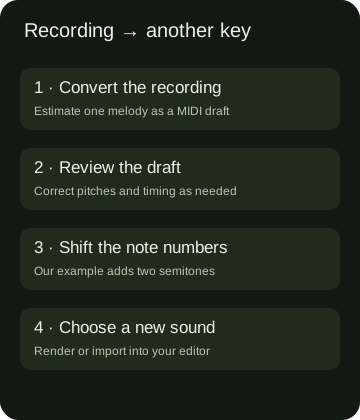
Convert an isolated recording to MIDI, review the draft, then shift every note by the same number of semitones. This changes the melody's pitch while keeping its MIDI timing. It creates notes for a new instrument; it does not pitch-shift the original recording.
One clear melody works best. Midilot does not separate instruments or recover a complete chord arrangement. The local helper below handles simple Midilot MIDI drafts.
Move the notes, keep the timing
Choose the MIDI you downloaded from Midilot, or load our actual measured draft. The helper runs locally. It exports note events and one tempo event, rather than preserving every kind of MIDI metadata.
Choose a MIDI draft or load the measured example.
| # | Before | After | Start tick | End tick |
|---|
Supported here: format 0, one track, 480 ticks per quarter note, one tempo and MIDI channel 1. Other files need a full MIDI editor. Pitch bend, programs, controller data and other metadata are not carried into this notes-only export. This is not a key detector.
What changed in our actual eight-note draft
On 2 November 2026 we selected our original synthetic eight-note WAV in the live browser converter, converted it and saved the actual MIDI download. The WAV was originally generated on 14 October; we did not present it as a new human performance. The new download contained eight notes in one format-0 track and occupied 119 bytes. We parsed the saved file independently, rather than treating the green completion message as a pitch measurement.
The input recording's programmed sequence is C4, D4, E4, G4, A4, G4, E4, C4. Our downloaded draft had that same pitch sequence. The first note began at tick 0 and ended at tick 401; the final note began at tick 3745 and ended at tick 4280. The file stores 480 ticks per quarter note and a tempo event of 500000 microseconds per beat. Those are export settings, not detected performance tempo.
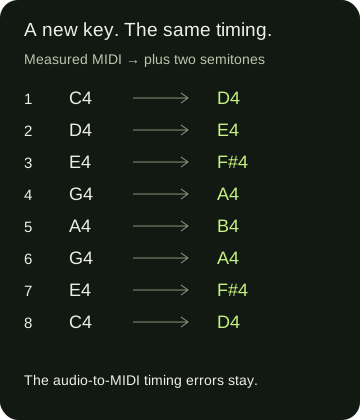
For the second file we used this page's plus-two-semitone operation, saved the browser-generated MIDI, then independently compared its events with the original. C4 became D4, D4 became E4, E4 became F sharp 4, G4 became A4 and A4 became B4. Repeated pitches move by the same amount each time. The complete after sequence is D4, E4, F sharp 4, A4, B4, A4, F sharp 4, D4.
The transformation is explicit: output note number = input note number + 2. For example, 60 + 2 = 62 changes C4 to D4; 64 + 2 = 66 changes E4 to F sharp 4. Every note in this pair retained its original start tick, end tick and velocity 88. Both downloads contained eight note events, so the operation neither added a harmony part nor removed a repeated note. The public event record below lets you check those statements against the files.
| Note | Before | After | Start tick | End tick |
|---|---|---|---|---|
| 1 | C4 | D4 | 0 | 401 |
| 2 | D4 | E4 | 401 | 959 |
| 3 | E4 | F#4 | 959 | 1516 |
| 4 | G4 | A4 | 1516 | 2073 |
| 5 | A4 | B4 | 2073 | 2630 |
| 6 | G4 | A4 | 2630 | 3188 |
| 7 | E4 | F#4 | 3188 | 3745 |
| 8 | C4 | D4 | 3745 | 4280 |
The earlier timing error survives
The second note starts at tick 401 in both files. At this file's fixed tempo, seconds = ticks / 480 × 500000 / 1000000, so 401 ticks is approximately 0.417708 seconds. Our programmed WAV puts the second tone at 0.58 seconds. The difference is about −0.162292 seconds before the shift and after it. We changed the key, not the source of that early onset.
This matters if you want to fit the melody into an arrangement: transposition can be the right next musical step while note timing still needs editing. The last event's end remains tick 4280, approximately 4.458333 seconds at the stored tempo. Keeping that value is a check that this operation preserved the draft's duration; it is not proof that the converter recovered the original note releases.
Watch the measured workflow: a short walkthrough of the actual MIDI pair and the timing that stays unchanged.
Use the draft in a different key
Recover one line
Start with a recording you may process and choose the isolated melody. Use the general conversion guide if you need the file-selection steps. Keep the recording alongside your MIDI so you can hear what the draft missed.
Choose the musical distance
Use a positive shift to raise the melody or a negative shift to lower it. Moving every note by the same amount preserves the intervals between those notes. It does not infer the original key, choose a singer's range or decide which new key fits an accompaniment.
Create and save a separate file
Keep the original draft. Choose a shift above, create the new MIDI and download it. The before-and-after table lets you inspect the note changes before opening the result in another tool.
Choose how to hear it
Import the new file into your MIDI editor, or use MIDI to MP3 for a simple synthetic preview. A new instrument sound is a playback choice. It will not restore the timbre of the original voice or recording.
What our local helper deliberately keeps narrow
We restrict the helper to the simple type of draft our converter exports: one format-0 track, 480 PPQ, one tempo event and the first MIDI channel. It rebuilds a notes-only file after checking the shifted pitch numbers and the unchanged note boundaries. A file with another timing format or multiple tempo events is rejected instead of silently flattened into a new performance.
Each generated result is separate from the chosen source. Changing the shift hides the previous download until you create the next file; selecting another input clears it too. A shift that would move any note outside MIDI note numbers 0 through 127 produces an error instead of clipping notes. These are local editing boundaries, not a claim of accurate transcription.
Questions about a melody in another key
Can I change the key after converting audio to MIDI?
Yes. Review the note draft, then transpose its note numbers in an editor or use the restricted local helper above for a simple Midilot draft. Check the result against the part you intended to recover.
Does this change the original audio file?
No. The operation creates another MIDI file. To change the sound of the original recording itself, use an audio pitch-shifting workflow.
Will transposition fix wrong notes or timing?
No. A wrong note moves by the same interval as the others, and this helper preserves the draft's event boundaries. The measured second-note example above shows an early onset surviving the shift.
Will the recording’s pitch bends survive this workflow?
This is a notes-only workflow. Midilot exports discrete note pitches, and this helper exports notes with one tempo event. It does not preserve pitch-bend or controller messages. If continuous pitch expression matters, choose and verify a workflow designed to keep it; a correct semitone shift alone does not establish that expression survived.
This boundary question was informed by a public discussion about retaining expressive pitch. The answer describes this implementation, not every MIDI converter.
Can this transpose all instruments in a finished song?
This page starts from one editable melody draft. Midilot's audio converter does not recover every instrument from a complete mix. Use a tool suited to that task before planning a multi-part arrangement.
Reference scope: synthetic separated tones, desktop Chrome, the specific files and current implementation. No cross-tool accuracy ranking, song benchmark or success-rate claim is made.