AUDIO TO MIDI / A TEMPO CHANGE WITHIN ONE MELODY
Audio to MIDI for a melody that changes tempo
Midilot exports one selected tempo. If your recording speeds up or slows down, check the note times and rebuild the tempo map separately before expecting the notes to follow a changing beat grid.
Measured answer. Our six-note source changed from 120 to nominally 90 BPM. The actual audio-to-MIDI download kept all six pitches, but contained only one 120 BPM tempo event. The later note spacing changed; the source tempo map was not recovered.
Watch the changing-tempo walkthrough: an English explanation of the original controls, actual tempo events and timing limits.
One control stays at the same tempo; the other changes halfway
We programmed two format-0 MIDI files with one track and 480 ticks per quarter note. Both contain C4, D4, E4, G4, A4 and C5. Their note starts are 0, 480, 960, 1440, 1920 and 2400 ticks; every keyed note lasts 360 ticks. The files therefore share their pitch order and beat positions.
The constant control contains one tempo event, 500,000 microseconds per quarter note at tick zero. The changing control starts with that same event, then adds 666,667 microseconds per quarter note at tick 1440. These encode 120 BPM and approximately 90 BPM: BPM = 60,000,000 divided by microseconds per quarter note. The integer 666,667 is the encoded value, so the later tempo is nominally rather than mathematically exactly 90.
The change occurs after three quarter notes: 1440 ÷ 480 × 500,000 ÷ 1,000,000 = 1.5 seconds. In the constant file, A4 starts at 2 seconds and C5 at 2.5 seconds. In the changing file, their starts are 1.5 + (1920 − 1440) ÷ 480 × 666,667 ÷ 1,000,000 = 2.166667 seconds and 1.5 + (2400 − 1440) ÷ 480 × 666,667 ÷ 1,000,000 = 2.833334 seconds. The beat positions stay the same while the later seconds change.
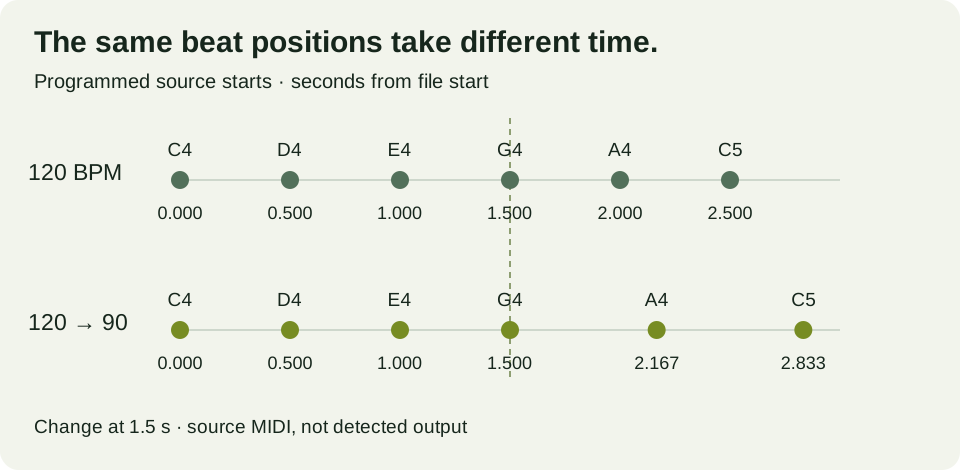
How we obtained the two audio files and real downloads
We rendered both original MIDI files locally using the exact parseMidi, synth and wav functions from the production audio helper, with the same Soft sine setting. This was a local Node execution of that source, not a browser-renderer session. The constant WAV contains 74,419 frames; the changing WAV contains 84,526 frames. Both are mono 16-bit PCM at 22,050 samples per second. Frame count divided by sample rate gives approximately 3.375011 and 3.833379 seconds, including the renderer's allocated tail buffer.
We selected each rendered WAV separately on the live WAV-to-MIDI converter in Chrome on 6 November 2026. The export tempo stayed at 120 BPM and the final-release estimate was enabled. Selecting the second file cleared the earlier result. Each conversion returned six notes and saved a separate 101-byte MIDI through its download link. We independently parsed the saved bytes, including every tempo event and note start, rather than treating the rounded on-screen table as the file.
Later note spacing changed, but the tempo map did not return
Both actual downloads contain C4, D4, E4, G4, A4 and C5 in that order. Each has one track, 480 ticks per quarter note and one 500,000-microsecond tempo event at zero. The constant control's tempo event is matched. The changing control's second event is absent.
| Note | Source start, s | Downloaded start, s | Source tick | Downloaded tick |
|---|---|---|---|---|
| C4 | 0.000000 | 0.000000 | 0 | 0 |
| D4 | 0.500000 | 0.441667 | 480 | 424 |
| E4 | 1.000000 | 0.929167 | 960 | 892 |
| G4 | 1.500000 | 1.439583 | 1440 | 1382 |
| A4 | 2.166667 | 2.089583 | 1920 | 2006 |
| C5 | 2.833334 | 2.763542 | 2400 | 2653 |
For the constant control, the downloaded A4 and C5 begin at 1.950000 and approximately 2.438542 seconds. For the changing control, they begin at approximately 2.089583 and 2.763542 seconds. That later spacing is different, even though both files declare the same constant export tempo. Detecting unequal time gaps is therefore different from reconstructing the source's tempo events.
In the changing output, C5 begins at tick 2653. With its one tempo event, the file time is 2653 ÷ 480 × 500,000 ÷ 1,000,000 = approximately 2.763542 seconds. Its position is 2653 ÷ 480 = approximately 5.527083 quarter-note beats. In the source, C5 begins at tick 2400, or beat five, and the two-part tempo map places it at 2.833334 seconds. A single tempo label does not establish the original beat position or exact start time.
The changing output's last two starts are 2006 and 2653 ticks. Their time gap is (2653 − 2006) ÷ 480 × 0.5 = approximately 0.673958 seconds. The programmed gap is 666,667 ÷ 1,000,000 = 0.666667 seconds. That is a local interval comparison; it does not mean that all attacks are correct. Across six corresponding starts, mean absolute onset error is sum of |downloaded start − programmed start| divided by six. The constant error sum is 0.301041667 seconds, giving approximately 0.050174 seconds; the changing error sum is 0.336459333 seconds, giving approximately 0.056077 seconds. All inputs are retained in the downloadable record.
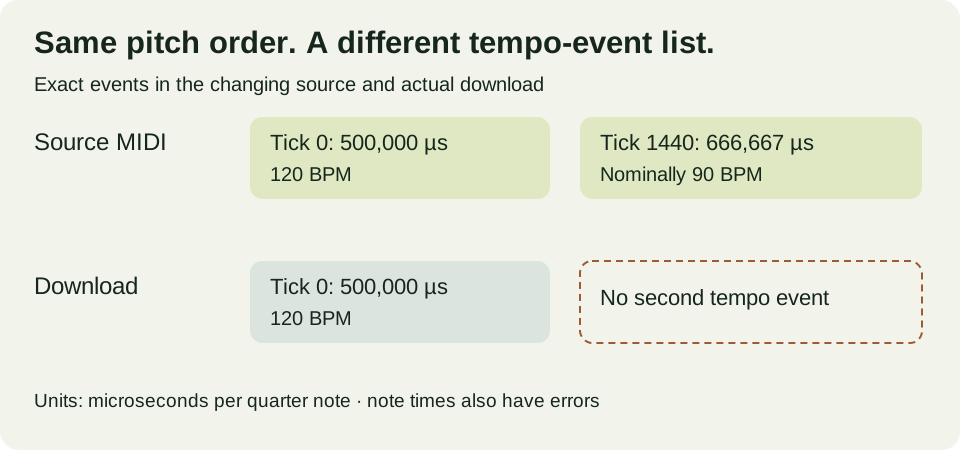
Choose how the recording should relate to the project grid
Keep the recording and an unchanged MIDI
Use a clear melody you are allowed to process. Save the first download before editing. Compare note starts with the recording, not only with the DAW's current bar lines.
Decide which timing should remain fixed
If you want the original performance against changing beats, build the appropriate tempo map in your music software and check where the notes land. If you instead want a constant-tempo arrangement, intentionally retime the notes against that grid. These are different editing aims.
Review each tempo transition
Check a beat anchor before and after the transition, then inspect the intervening notes. MIDI software can treat note positions and project tempo differently. We did not test a particular DAW, so the controls below are reference files to inspect, not a verified menu-by-menu DAW procedure.
Why the export BPM field is not a tempo-map editor
The current export implementation accepts one BPM value. It computes tempo = round(60,000,000 ÷ BPM), ticks per second = 480,000,000 ÷ tempo, then rounds each detected start time multiplied by ticks per second. It writes one tempo event before the note events. There is no sequence of detected tempo changes supplied to that writer. This is implementation analysis, separate from the measured note errors above.
At the selected 120 BPM, ticks per second is 960. That explains how a later estimated time can be stored as a later tick without adding another tempo marker. We did not run this pair with another export BPM, so we have not presented an unperformed comparison as a result. Nor did we isolate the detector and decoder as causes of each onset error.
Download the original controls and measured outputs
- Constant-tempo reference MIDI
- Changing-tempo reference MIDI
- Constant-tempo WAV
- Changing-tempo WAV
- Actual constant-control MIDI
- Actual changing-control MIDI
All events, hashes, formula inputs and outcomes · Rebuild both WAV controls
A question before editing the grid
Does a slower gap in the MIDI prove that a tempo change was detected?
Editorial question. No. In our changing control, the last two downloaded notes are farther apart than in the constant control, but both downloads contain only one 120 BPM tempo event. Check the tempo-event list and the note times separately. This run did not recover the original two-event map.
What these two controls cannot establish
The sources are programmed six-note sine-tone phrases with one abrupt tempo change, not a singer, live band or continuously varying performance. Each WAV was converted once in one desktop Chrome session. We did not test another converter, a gradual tempo ramp, source separation or DAW import. We changed the source tempo map while keeping pitch order and tick positions, so the note durations in seconds also change after the transition. The controls establish these files' timings and tempo metadata; they do not establish an accuracy rate for real music or a universal correction.
For the full process, see how to convert audio to MIDI. A different timing problem is preserving offbeat spacing; comparing two constant source speeds is covered in the tempo-matched loop test.